


Package Tracker, Flight Radar
4.038.00 Reviews
App Specs
- Version
- 2.1.0
- Updated On
- License
- Free
- Downloads
- 500,000+
- Developer
- Negroni
- Categories
- Shopping
- Platform
- Android
Screenshots


 Analysis by AppCompare
I judge a tracking app less by how many details it can display than by whether I can find the one detail I need when I’m in a hurry. That matters on a noisy station platform, at a crowded pickup area, or while trying to remember which parcel is due today. Package Tracker, Flight Radar brings parcel and flight tracking together, which gives it a useful role for people who switch between online orders and travel plans. Its appeal is practical: one place to check rather than a trail of separate carrier pages and airline messages.
Who benefits from putting parcels and flights together
I can see this being especially handy for someone who regularly orders from different shops and also meets friends or family at airports. A traveler might check a parcel’s progress before leaving home, then keep an eye on an incoming flight while arranging a pickup. The two kinds of tracking are not interchangeable, but having them side by side can reduce the small mental load of remembering where each update lives.
It is less compelling if you only ever need one carrier’s tracking page or want a dedicated flight-planning tool. A courier’s own app may be a better choice when you need account-specific delivery actions, while an airline’s app is usually the more direct place to manage a booking. I see this app as a convenient overview, not a replacement for every official service.
A calmer way to follow an ordinary delivery day
Picture a workday with a parcel expected while you are away from home and a relative arriving later by plane. I would add the parcel number and flight details ahead of time, then use alerts to decide when a quick check is worthwhile. That is more useful than repeatedly opening email, a carrier page, and an airline site just to see whether anything has changed. When an update matters, I can look at the relevant tracking information; when it does not, I can get on with the day.
A small practical habit helps: label or otherwise distinguish entries as soon as you add them, if the app gives you that option. Several similar orders can blur together in any tracker, especially when they come from the same retailer. I would also keep the original confirmation message until the delivery is complete, since it remains the best reference for the exact order and the carrier’s own instructions.
Tracking Made Easy
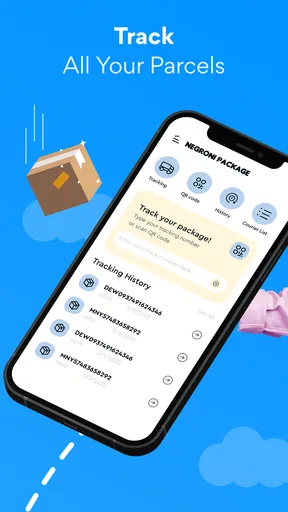
The first thing I noticed about Package Tracker, Flight Radar was its clean and intuitive interface. No clutter, just the essentials. It’s like the app read my mind! You can easily add your tracking numbers for packages or flight details in seconds, and boom, the app takes it from there. It supports a broad range of courier services and airlines, which is a huge relief.
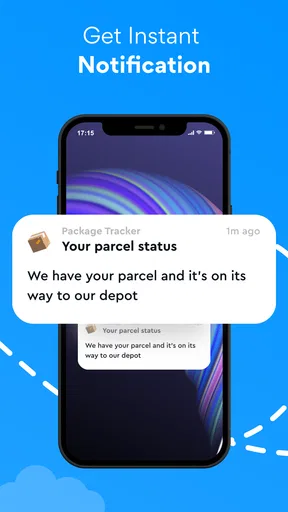
One of my favorite features has to be the real-time updates. Whether it's your Amazon order or your cousin's flight from Europe, the app keeps you updated with every little change. The notifications are prompt and informative, saving me from the constant urge to check my emails or browser tabs.
Worth Reading Before You Choose

EA SPORTS FC Mobile 26 Is a Bigger Football Game, but It Takes Time

Flipboard Shows What News Apps Must Do Beyond the Feed

Switching to Android Auto Means Rethinking Your Driving Routine

Google Calendar Makes a Crowded Week Easier to Manage

Ludo King Makes the Most of the Minutes Between Plans

Baby Panda World Brings Quick Play to Modern Phones, but Its Game Library Feels Busy
The Radar in Flight Radar
Now, about the flight radar part—it’s seriously cool. Imagine a live radar showing the exact position of flights. I felt like an air traffic controller, minus the stress. You can zoom in and see the altitude, speed, and more. It’s not just fun; it’s informative, especially if you're picking someone up from the airport or just satisfying your inner travel geek.
The app also gives you detailed information about airports, so if you’re planning a trip, it’s like having a mini travel guide in your pocket. From departure times to gate changes, it’s all there. I found this particularly helpful during my last trip when my flight got delayed, and I was able to plan my layover more efficiently.
Customize Your Experience
Another thing I appreciated is the level of customization the app offers. You can set your preferences for notifications, choose how you want your data displayed, and even integrate it with your calendar. It’s all about making your life easier, and who doesn’t want that?
The app’s user-friendly design extends to its settings, where you can tweak things to your liking without diving into a maze of menus. It’s straightforward and effective, just like how an app should be.
Readability, controls, and sensory comfort
In everyday use, I value an interface that lets me reach the important information without hunting through layers of options. The original experience here felt uncomplicated, and that can help when I’m checking a status quickly between other tasks. Still, a clean layout alone does not guarantee that every person will find text, icons, or map details comfortable. If you rely on larger display text, strong contrast, or screen-reader navigation, I would test those basics early rather than assume the app will suit your setup.
Tracking is often a glance-and-go activity, but flight maps invite longer attention. I would use the map when I have time to inspect a route, and switch back to written status details when I need a quick answer. That distinction can make the experience less demanding for someone who finds moving maps visually busy, or who prefers information presented in a more direct sequence.
Notifications also have a sensory trade-off. They can spare you repeated manual checks, but too many alerts can become distracting, especially when several parcels are moving at once. I would keep only the updates that change what I need to do—such as preparing for a delivery or timing an airport pickup—and silence the rest where the available settings allow it. The useful goal is not maximum notification volume; it is receiving the right prompt at the right time.
When connectivity and attention are limited
This kind of tracker is most valuable when I can check it at a convenient moment, not when I am relying on it as an emergency source. At an airport, I would use it for an extra view of flight progress, but still pay attention to the airline and airport’s own announcements for decisions about boarding or gates. At home, a parcel status can help me plan around a delivery, but it cannot replace the carrier’s instructions if a signature or another delivery action is required.
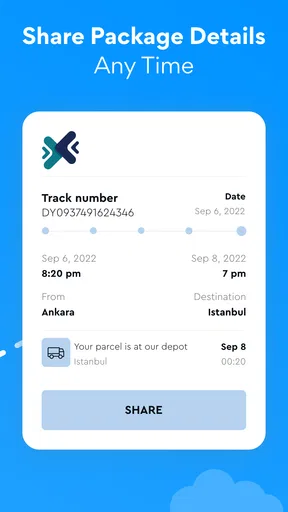
That separation is useful for people coordinating care, work, or travel around a delivery or arrival. One person can share the practical timing with someone meeting a traveler, for example, without treating a map or status estimate as a firm promise. I would build in a little flexibility: tracking information helps with planning, while real-world travel and delivery can still change.
Where a combined tracker has limits
The convenience of a single overview comes with a trade-off: a broad tracker is not necessarily the best place to resolve an unusual case. If a shipment is delayed, misrouted, or needs a delivery preference changed, the courier’s official channel is the sensible next stop. If a flight detail affects a booking, baggage issue, or check-in, I would go to the airline rather than assume a tracking screen can handle it.
There is also a difference between seeing a status and knowing exactly what to do next. A notification can tell me that something has changed, but I still need to interpret whether it calls for action. For important plans, I would treat the app as a useful second screen and keep the original booking or order confirmation accessible. That is not a flaw unique to this app; it is the sensible boundary for any service that gathers tracking information across different providers.
Why It Stands Out
What sets this app apart from others I've tried is its reliability. It’s one thing to have a bunch of features, but another to consistently deliver accurate information. The Package Tracker, Flight Radar app nails it. I didn’t encounter any glitches or inaccuracies during my use, which is more than I can say for some other apps out there.
Plus, it’s light on battery usage, which is a win-win because nobody likes an app that drains your phone battery faster than you can say "recharging."
Choosing it with realistic expectations
As a shopping app developed by Negroni, it has a broader everyday use than a parcel-only tool because flight information sits alongside delivery tracking. I would compare it with separate carrier and airline apps this way: use those official apps when you need to manage a specific order or booking, and use this combined option when the main job is keeping an eye on several moving pieces. Its average rating is 4.0 from around 1.1 thousand ratings, and more than 500 thousand installs suggest that many people have found a reason to try it. Those figures are context, not a guarantee that every carrier, route, or device will behave exactly as I want.
The app is free to install and rated for Everyone, so trying its basic approach does not require committing to a purchase up front. There are in-app purchases, priced from $4.99 to $29.99 per item, so I would check what a paid option actually adds before buying anything. The current version is 1.9.0, and it requires Android 6.0 or later. Those details make it easier to judge whether it fits your device and budget before you build it into a routine.
Final Thoughts
Overall, if you’re someone who likes to keep tabs on their packages and flights without the hassle, this app is a must-try. It combines efficiency with a dash of fun, wrapped in a user-friendly package. Package Tracker, Flight Radar is more than just a tool; it’s like having a personal assistant that’s always on top of things.
Whether you’re a frequent traveler or just an online shopaholic, this app is designed to make life a little less stressful. So go ahead and give it a whirl—I promise you won’t be disappointed.
My inclusive verdict
I would recommend it to people who want a straightforward place to monitor parcels and flights, particularly when juggling errands, deliveries, and airport pickups. The combination can save effort, and the uncluttered feel described in my experience is a welcome starting point for quick checks. For someone with specific visual, motor, or sensory needs, though, the best choice depends on how the actual controls, text, alerts, and map behave on their device; I would try the everyday tasks that matter before relying on it.
If you need to change a delivery, manage a booking, or make a time-critical travel decision, go directly to the carrier, airline, or airport source. If you mainly want a shared overview and a nudge when something changes, this app is a reasonable option to consider. I like it most as a practical companion rather than an all-purpose authority: useful for staying oriented, with the official provider still there for the decisions that matter.
Pros
- Real-time flight updates available.
- User-friendly interface with clear maps.
- Supports multiple tracking services.
- Customizable notification settings.
- Integrates well with other travel apps.
Cons
- Premium features require a subscription.
- Occasional ads in free version.
- Some data may have slight delays.
- Requires internet connection to function.
- Limited offline functionality.
FAQs for Package Tracker, Flight Radar
What features does the Package Tracker, Flight Radar app offer?
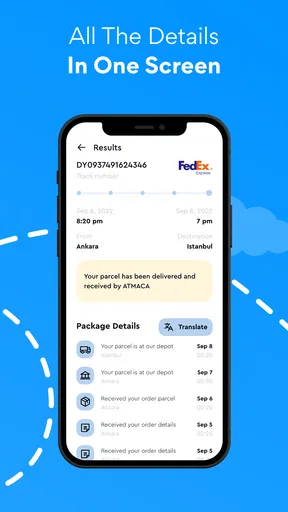
Package Tracker, Flight Radar provides a comprehensive suite of features including real-time tracking of packages and flights, notifications about status changes, and a history of past deliveries and flights. It integrates with major carriers and airlines, ensuring that users have up-to-date information at their fingertips.
Is the Package Tracker, Flight Radar app available for both Android and iOS?
Yes, the Package Tracker, Flight Radar app is available on both Android and iOS platforms. You can download it from the Google Play Store for Android devices and the Apple App Store for iOS devices, ensuring wide compatibility and accessibility for all users.
Does the app require a subscription or payment for full access?
The Package Tracker, Flight Radar app offers a free version with basic features. However, for advanced functionalities such as detailed tracking history, ad-free experience, and additional notifications, a subscription plan is available. This ensures that users can choose the level of service that best fits their needs.
How accurate is the real-time tracking feature in the app?
The real-time tracking feature in Package Tracker, Flight Radar is highly accurate, utilizing data directly from major carriers and airlines. The app updates frequently to reflect the most current information, allowing users to monitor their packages and flights with confidence and reliability.
Can I track multiple packages or flights simultaneously?
Yes, the app allows users to track multiple packages and flights simultaneously. You can organize and view all your tracking information in one convenient location, making it easy to manage and monitor various deliveries and trips without any hassle.


